
Property teams often operate with fragmented information, with maintenance, management, and energy teams working from different data sets. Fleet Commander centralizes your operations into one place. It delivers role-specific views, so every team member knows exactly what matters, what is urgent, and what to do next. You move from reactive chaos to a standardized, data-driven workflow that protects your assets and your time.
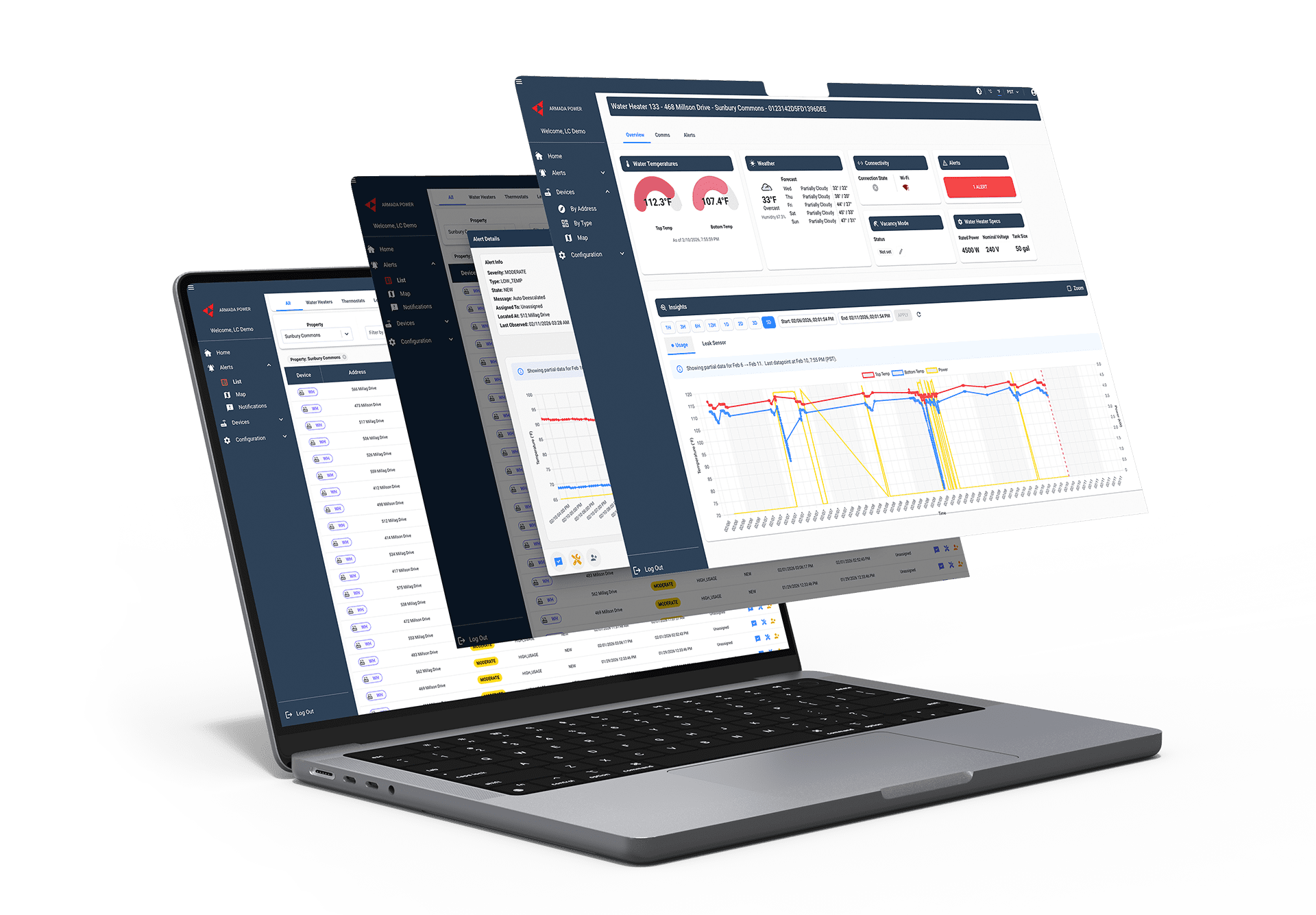
Fleet Commander Dashboard
Total Control Across Your Portfolio with Fleet Commander
Centralized Command for Operations and Energy Orchestration.

Efficiency at Scale
Actionable Intelligence Without the Guesswork
A Unified Command Center for Your Entire Team
Fleet Commander is the web-based operational heart of O&M Insights. It provides a single command center for managing water heaters, thermostats, leak sensors, and smart valves across your entire portfolio. From health data to automated load curtailment, Fleet Commander puts the power of your infrastructure in one place.
For Property Managers and Owners
Portfolio Wide Oversight – Oversee the operational health of all properties and connected devices from a single secure login. This centralized command allows you to benchmark performance across your entire portfolio at scale.
Intelligent Alert Routing – Automatically assign critical issues to specific team members with email notifications. This ensures accountability and confirms that the right person is dispatched to the right unit every time.
Automated Energy Savings – Remotely manage temperatures during turnover with Vacancy Mode. Set a move-in date, and the system will automatically restore the unit to normal operating levels to capture savings without manual intervention.
Audit Ready Compliance – Maintain a permanent digital record of every alert and repair. Export diagnostic data and mitigation logs as CSV or Excel files to provide insurance carriers with verifiable proof of operational rigor.
Geospatial Risk Mapping – Use color-coded map markers to visually locate active issues in real time. Identify high-risk clusters at a glance to deploy resources strategically and prevent localized issues from escalating.
For Maintenance Teams
Zero-Trip Diagnostics – Access temperature graphs and power usage history to identify specific component failures, like a burned-out element or a stuck relay, before you ever enter the unit.
One-Visit Resolution – Use remote performance data to ensure your team arrives at the door with the correct tools and replacement parts, eliminating exploratory first trips and reducing resident disruption.
Digital Maintenance Trail – Build a permanent, searchable health history for assets by logging “Resolve Messages” directly in the platform, ensuring equipment knowledge stays with the property.
Precision Threshold Management – Customize alert setpoints for specific equipment types or high-risk units, so you are notified only when a system deviates from its unique baseline.
Remote System Verification – After performing a repair, use the Status History and Graphs tabs to verify that the equipment is cycling correctly, providing immediate confirmation of a successful fix.
Automated Resolution
Fleet Commander finds problems and enables immediate action. Use the platform to automate system responses to reduce energy waste. You eliminate manual intervention while maintaining control over your portfolio.

Color-Coded Severity
Fleet Commander uses a five-level severity system to tell your team exactly what to act on first. You filter out the noise and focus on the specific alerts that impact property safety and resident comfort.

Energy & Load Orchestration
Armada transforms your buildings into grid-interactive assets. Use Fleet Commander to manage Demand Response events and monitor load curtailment to qualify for utility incentives. You turn energy into a performance variable.

Fleet Commander Capabilities
The Tools of Proactive Management
Fleet Commander moves beyond simple monitoring by providing the granular control necessary to manage a complex portfolio. By integrating geospatial data, energy orchestration, property management software connectivity, and deep diagnostic history into a single interface, the platform empowers your team to make informed decisions that protect your assets. These core features provide the visibility needed to identify systemic trends, verify utility compliance, and maintain a secure digital record of mechanical events across your properties.
Alerts & Device Map
Gain a geospatial view of your entire portfolio. Yellow or red indicators show you exactly where attention is needed.
Advanced Insights & Reporting
Access interactive usage and sensor graphs with selectable time ranges from one hour to 30 days to benchmark performance.
User & Access Control
Manage unit addresses, user accounts, and roles. Audit permissions quarterly to maintain security and verify property-level access.
DR Event Monitoring
Gain visibility into utility-driven energy events. Track your property’s performance during curtailment windows to maximize financial benefits.
Common Questions
Getting the Most from Your Dashboard
How does the alert severity system work?
Fleet Commander uses a five-level, color-coded severity system to help teams prioritize their response:
Critical (Dark Red): Immediate action required to prevent significant damage or safety risks.
Severe (Red): Potentially dangerous situation requiring immediate attention.
High (Orange): Issues that need attention when resources allow.
Moderate (Yellow): Mid-level priority for routine follow-up.
Low (Blue): Non-urgent informational alerts that may signal developing problems.
Can I assign specific alerts to my maintenance team?
Yes. You can route any alert to a specific user or email address using the “Assign Alert” function. The assigned team member will receive an automatic email notification with all relevant alert details.
What is Vacancy Mode, and how do I use it?
Vacancy Mode allows you to temporarily lower water heater temperatures during unit turnovers to save energy. You can set a specific end date and time, after which the system will automatically restore the device to its normal operating temperature.
How can I verify if a device is actually offline?
You can check the Comms Tab in the Device Details hub to see the device’s connection percentage over the last 1, 7, 14, and 30 days. Devices consistently showing below 80% connectivity may require Wi-Fi troubleshooting or router adjustments.
Can I customize when an alert is triggered?
Yes. Authorized users can adjust “Alert Setpoints” in the Device Details Alerts Tab. This includes setting custom thresholds for maximum/minimum temperatures and leak sensor sensitivity to match the specific needs of your property.
Command Your Portfolio with Confidence
Stop managing your properties through the rearview mirror. Put operational intelligence and energy orchestration at your fingertips with Fleet Commander.
